

Give
Your generosity supports the ministry of Grace Baptist Church in Hamtramck.
"Each of you should give what you have decided in your heart to give, not reluctantly or under compulsion, for God loves a cheerful giver.
— 2 Corinthians 9:7
"Honor the Lord with your wealth, with the firstfruits of all your crops.
— Proverbs 3:9
Give via Zelle
Zelle is a no-fee way to give to Grace. Using your bank's mobile app (not a website on your computer), find the Zelle interface. Each bank's interface is different, but normally you'll find it under Transactions, Transfers, or Payments.
Add Grace as a Recipient (one time only)
You only need to do this once. Use the QR code below in your bank app to scan and add Grace instantly — this is the easiest method. If you can't scan the QR code, tap the direct link instead.
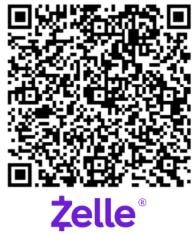
Can't scan the QR code?
Open Zelle enrollment linkOpens the Zelle enrollment page to add Grace directly.
Or Add Grace Manually
Look for an option or icon to add a new recipient or contact. In some cases, you may need to start typing "Grace" in the name field to see the option to add a new recipient. In the Add screen, select Business if available, and enter the email address: giving@graceinhamtramck.com
Send Your Contribution
Once Grace is in your contacts list, tap Send and choose Grace from your contact list to send your contribution.
Zelle email address
giving@graceinhamtramck.com